
Super Quick Settings Pro Mod Apk: Android devices come with a variety of features that allow users to customize their experience. One of the most essential tools is the Quick Settings panel, which provides shortcuts to various functions such as Wi-Fi, Bluetooth, brightness control, and more. However, some users may require even faster access to these settings, which is where Super Quick Settings comes into play. This guide will explore what Super Quick Settings are, how they enhance usability, and how you can make the most of them.
What is Super Quick Settings on Android?
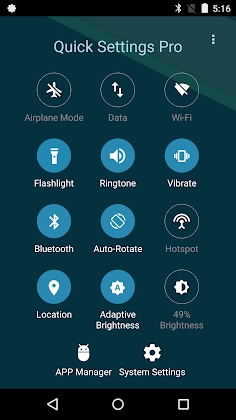
Super Quick Settings is an advanced customization tool that allows users to personalize their Quick Settings menu beyond the default Android options. It provides additional controls, shortcuts, and widgets to improve accessibility and efficiency when using an Android device. With Super Quick Settings, users can:
- Add custom toggles and shortcuts.
- Reorganize and resize tiles for better usability.
- Access deeper settings without navigating through multiple menus.
- Enhance productivity with one-touch actions.
Features
Customizable Tiles and Toggles
One of the primary benefits of Super Quick Settings is the ability to customize tiles. Unlike the default Quick Settings menu, which comes with preset options, Super Quick Settings allows you to:
- Add new toggles such as screen recording, battery saver, and data usage tracking.
- Modify the placement of tiles for easy access.
- Change tile icons and colors for better visibility.
Enhanced Accessibility
Super Quick Settings improves accessibility by offering features such as:
- One-tap actions: Instantly enable or disable functions like Do Not Disturb or Airplane Mode.
- Gesture-based controls: Swipe or tap to perform common actions without opening multiple menus.
- Expandable controls: Some tiles offer extra functionality when long-pressed, like showing detailed Wi-Fi networks or battery stats.
Integration with Third-Party Apps
Unlike the default Quick Settings, Super Quick Settings can integrate with third-party applications, enabling users to:
- Add app shortcuts for instant access to frequently used programs.
- Control media playback without needing to open a specific app.
- Launch automation apps like Tasker directly from the settings panel.
Advanced System Controls
For power users, Super Quick Settings offers advanced system controls such as:
- CPU performance toggles for overclocking or saving battery life.
- RAM cleaner shortcuts to instantly free up memory.
- Screen timeout controls for adjusting display settings on the fly.
How to Enable and Use Super Quick Settings
Download and Install the App
Super Quick Settings can usually be found on the Google Play Store or other Android app repositories. To install it:
- Open the Google Play Store.
- Search for “Super Quick Settings.”
- Tap “Install” and wait for the installation to complete.
Grant Necessary Permissions
To function correctly, the app may require certain permissions such as:
- Accessibility access for customizing system toggles.
- Overlay permission to display settings over other apps.
- Device admin access for deeper control over security settings.
Customize Your Quick Settings Menu
Once installed, open the app and:
- Navigate to the settings panel.
- Select and add the desired toggles.
- Reorganize them by dragging and dropping.
- Apply themes or color schemes for a personalized look.
Use Gesture and Automation Features
To further enhance usability:
- Set up gesture-based actions like double-tap to open a specific setting.
- Enable automation to change settings based on time or location.
- Use third-party integrations for seamless operation with other apps.
Benefits of Using
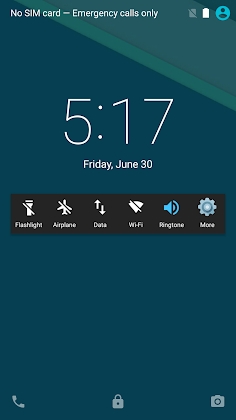
- Improved Efficiency: Perform actions faster without navigating through multiple settings pages.
- Personalization: Customize the Quick Settings panel according to your needs.
- Enhanced Accessibility: Make your device easier to use with shortcuts and gesture-based controls.
- Better Productivity: Save time by accessing essential settings with one tap.
Potential Drawbacks
While Super Quick Settings offers several advantages, there are a few potential drawbacks to consider:
- Some features may require root access for full functionality.
- Excessive customization can lead to cluttered UI if not well-organized.
- Certain permissions may raise privacy concerns if granted to third-party applications.


Leave a Reply