
Call Forwarding Pro gives you a place to enter a backup number and decide when incoming calls should go there. Android Buddy’s app sends the forwarding request to your mobile carrier. Once the line accepts the rule, callers can reach the backup number under the conditions you selected.
Which calls should be redirected?
- All Call
- Send every incoming call to the destination number. Choose this when someone else will answer the line for a while.
- Not Answered
- Let your phone ring first and pass the call to the backup number after you miss it.
- Not Reachable
- Forward the call when your phone is off or out of coverage, where the carrier offers that rule.
- Busy
- Pass the call on when your line is already in use, where your network supports it.
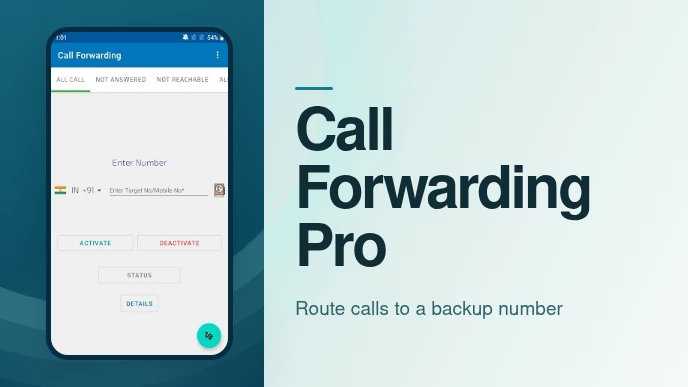
The older screen shown here has separate Activate, Deactivate and Status buttons. Enter the full destination number on the rule you want, activate it, then place a test call from another phone. For Not Answered, let the first phone ring through so the test actually reaches the rule you set.
DLAndroid lists the older APK here as Paid. Android Buddy’s current Play description also covers an activity log and adjustable ring delay. The screenshots on this page show the older interface.
When the line does not forward
Start with Status and check which line you used on a dual-SIM phone. Forwarding options differ by operator and plan. An error after activation is a reason to check your carrier’s instructions for that specific rule. Your plan may charge for forwarded minutes or for reaching a number outside your calling area.



Leave a Reply