USB Audio Player PRO MOD APK turns a regular Android phone into a serious hi-fi player. The app bypasses most of the usual Android audio limits and talks directly to your DAC or HiRes chip, so your music keeps its detail, dynamics and space instead of being squeezed into standard 16-bit / 48 kHz processing. For listeners who care about sound quality, it feels closer to a dedicated digital audio player than to a normal phone.
Many users search for USB Audio Player PRO MOD APK download or UAPP paid version because they want that full experience without restrictions. This page focuses on what the app actually does in daily use, the sound features that matter and how the unlocked build changes the experience.
USB Audio Player PRO overview
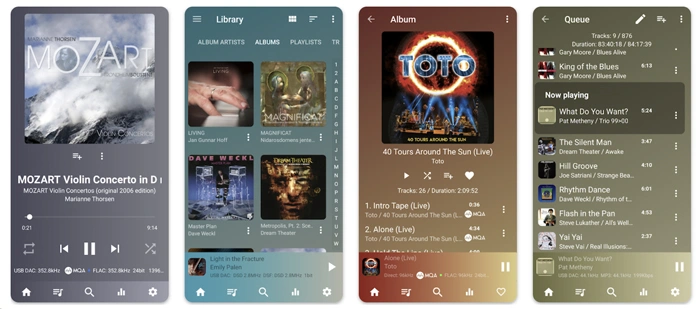
USB Audio Player PRO is built for audiophiles, studio engineers and anyone who listens with good headphones or speakers. The app supports external USB DACs, HiRes audio chips in many modern phones and almost every common and rare music format. Playback is bit-perfect when possible, so the signal that leaves your phone matches the original file instead of being resampled by the Android mixer.
On devices with compatible HiRes chips, UAPP can send 24-bit audio straight to the hardware without downsampling. When you plug in a USB DAC through OTG, the app switches to its own USB audio driver and lets the DAC decide the sample rate and resolution.
Hi-res playback, DAC support and Bluetooth audio
With the right hardware, USB Audio Player PRO can handle very demanding files. The app supports playback up to 32-bit / 768 kHz, plus DSD and MQA for users with compatible DACs. In practice, this means:
- Playback of FLAC, WAV, ALAC, AIFF, APE, WAVPACK, DSD, SACD ISO, MQA and more
- Options for native DSD, DoP and DSD-to-PCM conversion
- Bit-perfect mode that bypasses the Android audio stack where possible
The app also works with many Bluetooth DACs and headphones. On a lot of Android 8+ devices it can switch the Bluetooth codec, such as LDAC or aptX, and adjust the sample rate around the source material, so wireless listening keeps more detail instead of being locked to a fixed profile.
Streaming, library and network playback
USB Audio Player PRO is not only for local files. It can connect to several online and network sources, which makes it useful as the main music hub on your device:
- Direct streaming from TIDAL and Qobuz with support for HiRes FLAC and MQA where available
- Internet radio and Shoutcast for easy background listening
- Playback from UPnP/DLNA servers on your home network
- Network access via Samba, FTP and WebDAV for NAS users
With the optional feature pack, the app can capture audio from other applications on Android 10+ and route it through its own sound engine. This allows playback of services that do not have native integration while still using the USB audio driver and your preferred sample rate.
The local library side is simple but practical: true folder playback, quick browsing by directory and the option to build a library from local storage or selected network locations. Gapless playback and replay gain keep albums flowing naturally even when tracks come from different sources.
Sound tuning tools for demanding listeners
Out of the box, UAPP includes a 10-band equalizer, tone controls and both software and hardware volume options. Users who want more control can unlock advanced tools from ToneBoosters:
- A full parametric EQ with precise frequency, Q and gain controls for detailed tuning
- MorphIt headphone simulator, which offers correction curves for hundreds of headphone models so you can get a more neutral response or emulate different signatures
Upsampling, sample-rate conversion for unsupported rates, synchronized lyrics, last.fm scrobbling and Android Auto support round off the package. Together these features make the app feel like a complete listening environment rather than just another music player.
MOD APK and unlocked features
The MOD build often removes payment barriers inside the app and unlocks premium functionality that is normally behind in-app purchases. Typical changes in a MOD version include access to the full audio engine, advanced codecs, USB audio driver options, expanded EQ features and an ad-free experience.
This type of build is not an official release from the original developer. Treat it as a way to see how USB Audio Player PRO behaves with everything enabled and, if you rely on it every day, supporting the creators by buying the paid version on Google Play remains the most stable and ethical option.
Installation and basic setup on Android
After downloading the USB Audio Player PRO MOD APK file from this page, install it on your device the same way you install any sideloaded app, following the security prompts from Android.
- Open your file manager and tap the downloaded APK.
- Allow installation from this source if Android asks for permission.
- Wait until the installation completes and then launch the app.
- Connect your USB DAC with an OTG cable or use your wired or Bluetooth headphones.
When the app is running, open the audio settings screen inside UAPP. Enable the USB audio driver, choose bit-perfect or upsampling mode, select how you want to handle DSD files and adjust buffer sizes if you notice pops or drop-outs during playback.
Tips for the best listening experience
- Keep your music in lossless formats such as FLAC, WAV or ALAC when possible.
- Use a good quality OTG cable and, for power-hungry DACs, consider a powered USB hub.
- When streaming from TIDAL or Qobuz, select HiRes or Master quality inside the service section of the app.
- Try MorphIt or the parametric EQ to match your headphones and room instead of using generic presets.
- Disable other audio effects or system-wide equalizers that may interfere with bit-perfect playback.
Summary for USB Audio Player PRO MOD APK
USB Audio Player PRO MOD APK is aimed at listeners who care about every detail in their music and prefer to control their audio chain from file to DAC. With support for USB DACs, HiRes chips, advanced streaming and powerful tuning tools, it turns an Android device into a flexible hi-fi source. The unlocked experience lets you explore the full potential of the app on your own setup and decide later if you want to stick with the official paid version.


My Realme 3 cannot run the application
Need update.
Not working.
USB Audio Player PRO 5.1.5 Apk Paid full Latest
not working!!!
I update it
how to skip lisence verification?
dat not work for me..
plss help me….
It doesn’t work, License vilification failed when try to play song ,
Please provide the introduction to install
With android tv don’t work, ask to registrate at the site, help
Need update
Thanks
updated