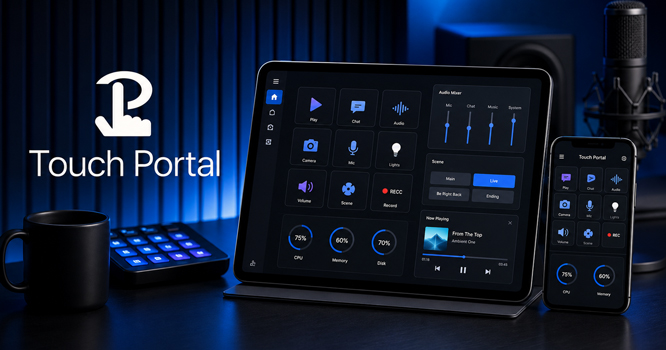
During a recording session, reaching the right command can mean leaving the active window or looking through an OBS menu at the wrong moment. Touch Portal Pro Mod APK moves those repeated controls onto an Android phone or tablet beside the keyboard. The mobile screen shows buttons and sliders chosen for the current task rather than a copy of the computer display. It is a customizable macro deck, not a remote desktop.
The phone is only the visible part of the setup. Pages are built in the Touch Portal desktop program, where every control receives an action. The Android client displays the finished layout and sends each tap back to the computer. When the desktop program is closed, the controls have nowhere to go. The APK cannot operate as a standalone computer remote.
One button, several steps
A useful macro is built around an interruption that happens often. Moving an OBS broadcast to a break scene is a good example. The scene and microphone may need to change almost together, and doing one while forgetting the other can expose the wrong picture or audio. Both commands can be attached to the same button and executed in a chosen order.
Some programs need a moment to respond before the next action arrives. Touch Portal can place a timer between the steps, but the delay has to suit the actual routine. A command sent too early may be missed. A long pause leaves the user wondering whether the button responded.
Programs without their own Touch Portal integration can often be controlled through ordinary keyboard shortcuts. This is enough for many desktop tasks, but the shortcut goes to whichever window currently has focus. A key combination intended for one program may do nothing—or perform a different action—when another window is active. Changes made later to the program’s keyboard bindings must also be reflected in the Touch Portal page.
A button can look correct and still report the wrong state. After sending a mute command, for example, an on/off control may simply remember its last press. It does not automatically prove that the microphone changed. Accurate feedback depends on the target program or connector returning its current status.
Volume sliders behave in a similar way. A smart connector receives changes from the computer, so moving the system volume elsewhere can also update the slider on the phone. A one-way connector only sends commands. Its displayed position may become outdated after the volume is changed outside Touch Portal.
A phone screen fills up quickly
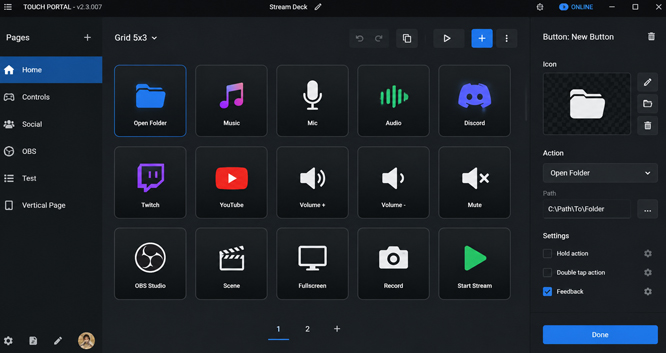
The free base uses a 4-by-2 grid and provides two usable pages. Official Pro access allows more pages and custom grids containing up to 110 controls. The larger number is a capacity limit, not a sensible layout for every device.
A dense grid may look impressive in the desktop editor and become awkward as soon as it reaches a phone. Labels shrink, neighbouring controls sit closer together, and there are no physical dividers to guide a finger. Commands needed in a hurry should remain large enough to identify and tap without searching through a wall of icons.
Separating live controls from setup controls usually produces a more dependable layout. Buttons used during recording can stay on the first page. Actions for opening programs, preparing scenes, or changing less frequent settings can remain elsewhere. A command such as Stop Recording also deserves space away from normal page navigation, where an accidental press is less likely.
Tablets have enough room for denser arrangements. An older phone is better suited to a short group of frequent actions. Adding every available command to the same screen does not remove work; it replaces menu searching on the computer with icon searching on the phone.
Pages shared by other users require a closer look before use. A layout may refer to program locations, images, audio files, stored values, or plugins found only on its creator’s computer. The buttons can appear normally even when their underlying actions are incomplete.
Plugin support belongs to the official Pro feature set, but third-party plugins are developed outside the Touch Portal team. Their compatibility and setup depend on the individual project. Importing a page that relies on one does not automatically supply the required plugin or its settings.
The Android app is one link in the chain
Every tap travels from the mobile app to the Touch Portal desktop service and then to the program being controlled. Communication normally uses the local network. Android and Windows can also connect through USB.
The mobile and desktop releases must remain compatible. This is especially relevant to a separately downloaded APK, since a newer desktop application may not communicate with an older Android release. When their major releases do not match, the phone may display its pages but fail to establish a usable connection.
OBS introduces another link through WebSocket. Scene changes, recording controls, source visibility, and audio commands depend on that connection. A disabled WebSocket server or mismatched authentication and port settings can leave the OBS buttons inactive even though the phone remains connected to the Touch Portal desktop program.
Official desktop support covers Windows and macOS, while Linux is listed as an open beta. The Android support policy expects the device’s original operating system and Google Play services. Rooted phones, custom ROMs, Chromebooks, and Android emulators are outside that policy. The application might still open in some of those environments, but official support does not confirm reliable connection or licensing behaviour there.
The standard arrangement uses one primary mobile device. Connecting several phones or tablets at once is handled through a separate Multiple Devices upgrade, so the official meaning of Pro does not include every optional Touch Portal purchase.
Dlandroid lists the supplied modification as “Pro / Paid Features Unlocked.” It does not include a separate record for each changed component. The description therefore does not confirm the Multiple Devices upgrade, optional graphics additions, or compatibility with the newest desktop software.


Leave a Reply