
The Combo Breaking System is where The World 3: Rise of Demon makes its boss fights different from its regular encounters. A boss can string moves together once it starts attacking. The action RPG from Good Games and OXON lets you break that sequence and use the opening to strike back. The timing matters because the chance to respond begins with recognizing what the enemy is doing.
Learning the controls on smaller enemies
The Android screen puts movement on a pad at the left and attack controls on the right. The large weapon icon is for ordinary attacks. A smaller button with a foot symbol activates the dash. Use it to get out of the path of a larger attack, then look back at the weapon control when you are close enough to strike. The lift and slam buttons sit in the same group so you can reach them without moving your hand away from the attack side.
The World 3: Rise of Demon Mod Apk also distinguishes ordinary swings from heavier blows. Use a group of smaller enemies to get a feel for the space each move covers. A heavy hit may look like the most direct choice, but it helps to know where the character will end up when the move finishes.
Breaking the boss’s sequence
The game’s boss encounters bring the timing problem into focus. A moment when you can interrupt the boss serves a different purpose from a moment when you are already free to attack. Look for how the next part of the animation begins. A successful interruption gives the character time to respond before the fight returns to its regular pace.
That is also one reason to pay attention to shorter attacks. A normal swing can leave time to see the enemy’s next move without committing to every skill at once. An opening created by a combo break is a better opportunity for a more forceful follow-up. That change of pace is the point of the boss system.
Equipment and the next encounter
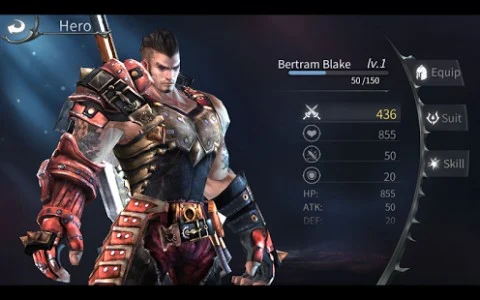
Boss victories can bring loot and progress to carry into the next encounter. The character screen shows statistics and separate areas for equipment and skills. A weapon is part of the current setup, while upgrading a skill changes what you can do once the fight starts. Look at those screens between stages rather than trying to judge a change from a loot notification alone. The selected character and weapon are visible there before you return to the stage controls.
The character screen also keeps the equipped gear near the visible attack, defense and health values. Compare the value that matters for the next stage before you leave the menu. If you are looking for a different action in combat, go to the skills tab. Changing a weapon and changing which skill you use are separate choices in the Android interface.
Linking a lift to a finishing move
The foot icon, lift control and slam control let you follow an enemy through a short sequence. Dash moves the character into position or out of reach. A lift puts the enemy in the air, and a slam sends it down again. Leave enough time to see where the lift puts the target before pressing the slam. The sequence is easier to read on a regular enemy than during a boss interruption.
When you are practicing on a regular enemy, try a lifting skill followed by a slam and watch where the enemy goes between the two. The distance between the moves helps you judge whether the two skills fit together. Save the boss interruption for the separate job of making room for a counterattack.


Can you suggest some more ways to get free diamonds in free fire
Can you suggest some more ways to get free diamonds
Buy it from game 🙂
Good