
Super S9 Launcher for Galaxy S9/S8/S10 launcher Mod Apk: Samsung Galaxy phones are known for their clean interface, distinctive icons, smooth animations, and polished home-screen design. For Android users who like the Galaxy experience but do not own a Samsung flagship, a launcher can provide a convenient way to recreate some of that visual style.
What Is Super S9 Launcher?
Super S9 Launcher is a home-screen replacement application designed around the visual style associated with Samsung Galaxy S-series smartphones.
Instead of replacing Android itself, a launcher changes the way the home screen, app drawer, icons, and other interface elements are displayed.
This means users can experiment with a Galaxy-inspired design without changing the phone’s operating system or installing custom firmware.
The launcher can be particularly interesting for people who enjoy Samsung’s interface but use a different Android smartphone.
Main Features of Super S9 Launcher
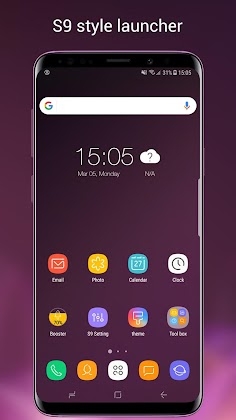
Galaxy-Inspired Home Screen
The main purpose of Super S9 Launcher is to recreate elements of the Galaxy interface.
After applying the launcher, supported devices can receive a redesigned home screen with a Samsung-inspired visual appearance.
The exact result depends on the Android version, phone manufacturer, screen resolution, and launcher settings.
Custom App Icons
Icons play a major role in the overall appearance of a launcher.
A Galaxy-inspired icon style can make the home screen look more consistent and help create the impression of a Samsung-style interface.
Users can arrange frequently used applications on the home screen and keep less frequently used apps in the application drawer.
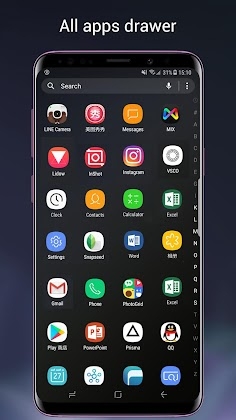
App Drawer
The app drawer provides access to installed applications without placing every icon directly on the home screen.
This makes it easier to maintain a clean layout while keeping all applications accessible.
Wallpapers
Wallpapers can significantly change the appearance of an Android device.
Super S9 Launcher can work with Galaxy-inspired wallpapers and other backgrounds to create a more complete visual transformation.
Combining a suitable wallpaper with matching icons can make the launcher feel more cohesive.
Widgets
Widgets provide information or shortcuts directly on the home screen.
Depending on compatibility and the Android version, users can place supported widgets on different areas of the launcher and customize their layout.
Launcher Customization
One of the main advantages of using a third-party launcher is the ability to modify the appearance of the home screen without replacing the entire operating system.
Customization can include elements such as:
- Icon arrangement
- Home-screen layout
- Wallpapers
- App drawer appearance
- Search features
- Folder organization
- Screen transitions
- Gesture-related controls
Available options depend on the specific version.
Super S9 Launcher for Galaxy S9/S8/S10
The application’s name references several Samsung Galaxy models:
- Galaxy S8
- Galaxy S9
- Galaxy S10
The launcher is intended to reproduce aspects of the visual experience associated with these devices rather than physically turning another smartphone into a Samsung Galaxy.
A launcher cannot reproduce Samsung-exclusive hardware features or the complete One UI software environment. Its purpose is primarily visual and functional customization.
How to Install and Use Super S9 Launcher
Install the Launcher
Install the application on your compatible Android device.
After installation, open it and follow the initial setup instructions.
Set It as the Default Launcher
Android may ask which launcher you want to use as the default home application.
Select Super S9 Launcher if you want the Galaxy-inspired interface to appear whenever you return to the home screen.
You can usually change the default launcher later through Android’s system settings.
Customize the Home Screen
Arrange your most frequently used applications and choose a suitable wallpaper.
Avoid placing too many icons on one screen if you prefer a clean Galaxy-style layout.
Organize Applications
Use folders and the app drawer to keep your applications organized.
Grouping similar apps together can make navigation faster.
Explore Launcher Settings
Open the launcher settings and review the available customization options.
You may find controls for icons, layout, transitions, wallpapers, gestures, and other visual elements depending on the version.
Super S9 Launcher Mod APK Features
A Super S9 Launcher Mod APK is a modified version of the launcher distributed outside the standard application channel.
Third-party versions may advertise features such as:
- Premium customization unlocked
- Additional themes
- Extra wallpapers
- More icon options
- Ad-free usage
- Additional launcher settings
- Unlocked personalization features


Leave a Reply