qDslrDashboard turns your Android phone or tablet into a full-featured controller for Nikon, Canon, and many Sony mirrorless bodies. You get live view on a bigger screen, fast access to exposure and focus, and direct RAW/JPEG transfer. This page provides the qDslrDashboard APK / qDslrDashboard Mod APK for direct download on Android.
Remote control that feels familiar
- Change shutter speed, aperture, ISO, and exposure compensation from the app.
- Start/stop video, trigger single shots or bursts, and use a bulb timer for long exposures.
- Tap-to-focus, step focus precisely, and run focus stacking for razor-sharp macro/product shots.
- Live histogram and clipping warnings help you nail exposure before pressing the shutter.
- Save custom presets for repeated setups (studio, landscape, astro).
Connection options that actually work
- USB OTG: most reliable for many Nikon/Canon bodies; use a quality OTG adapter and short cable.
- Built-in Wi-Fi / hotspot: join the camera’s Wi-Fi (when supported) or connect both devices to the same hotspot.
- Portable router: a travel router can extend range on set while keeping latency acceptable.
USB usually offers the lowest delay for live view and the fastest transfers.
Timelapse and advanced automation
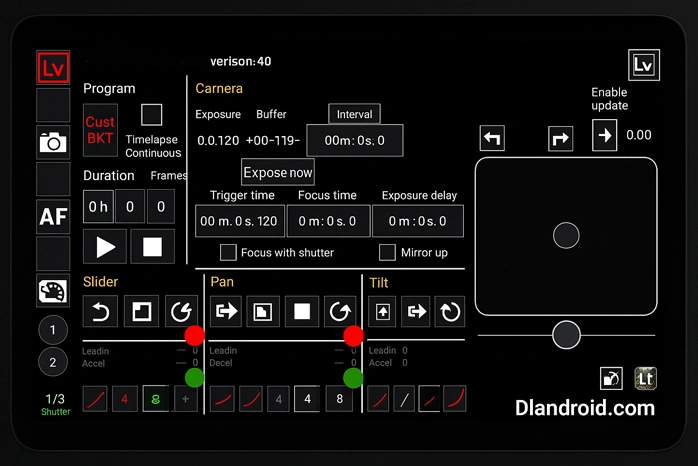
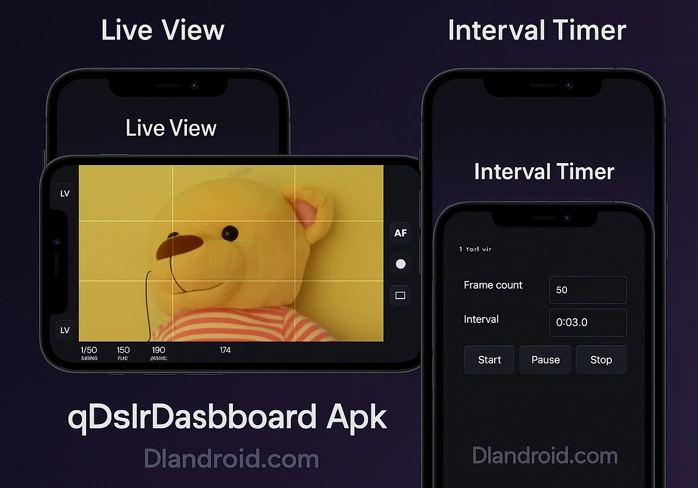
- Intervalometer with flexible schedules (frames, interval, duration).
- Exposure bracketing and HDR sequences with automatic series naming.
- Day-to-night exposure ramping for smooth “holy grail” timelapses.
- Focus ramping to build deep-focus stacks across a scene.
One screen replaces multiple remotes and keeps workflows consistent.
Mobile-first file transfer
- Review shots fullscreen, then pull selected RAW or JPEG files to Android for quick edits or sharing.
- Set auto-import to grab just-shot frames, only a bracketed run, or limit it to JPEGs when you need to save bandwidth.
- Keep projects tidy with dedicated folders so hand-offs to Lightroom Mobile, Snapseed, or your cloud backup stay clean and predictable.
Real-world use cases
- Studio/product: tether to a tablet for client preview, check focus at 1:1, and keep the set cable-free with Wi-Fi.
- Macro: drive micro focus steps and stack later for maximum depth.
- Landscape/astro: run bulb shots, interval timelapses, and exposure ramping while watching the histogram.
- Wildlife or self-portraits: park the camera where you need it and fire the shutter from your phone without drawing attention.
Quick start on Android
- Install the qDslrDashboard APK on a device with USB OTG support (Android 7.0+ recommended).
- Put the camera in PC/remote mode (on Sony choose “PC Remote”; on many Canon/Nikon bodies disable in-camera Wi-Fi if using USB).
- Connect via USB OTG or the same Wi-Fi network, then open the app and select your camera.
- Confirm live view, set exposure, and shoot a test frame.
- Set transfer rules and your storage folder before longer sessions.
Compatibility notes
- Supports many Nikon DSLRs and Z-series, a wide range of Canon EOS DSLRs/mirrorless bodies, and select Sony models that allow PC Remote over USB/Wi-Fi.
- Feature depth (video control, AF behavior, live histogram) varies by body and connection type; if a control isn’t available, try a different connection or another body/firmware.
Stability tips
- Use short, high-quality USB cables; add a powered hub if the camera drops connection.
- Disable Android battery savers that restrict background activity; grant USB permissions when prompted.
- For Wi-Fi, keep line of sight, prefer 5 GHz, and avoid crowded channels.
- Before paid work, rehearse the whole flow—connect, shoot, transfer, and verify backups.
About this build
This page hosts the qDslrDashboard APK / qDslrDashboard Mod APK for direct download so you can test on devices without Play Store access. If it becomes part of your daily kit, consider supporting the original developer through an official purchase to keep camera compatibility moving forward.

Leave a Reply