
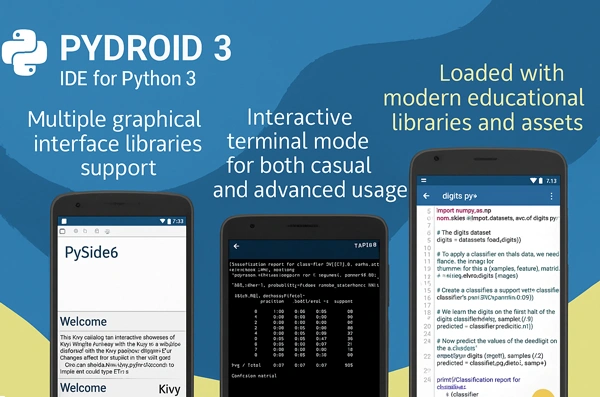
Python can be run natively on Android with Pydroid 3 Premium Apk. You can run scripts, add libraries, and even build native code on your Android device with Pydroid 3. You don’t even need a computer to do these things. It’s small, powerful, and made for times when you want to code without your normal setup.
Things You Can Do
| Feature | Description |
|---|---|
| Offline Python 3 interpreter | Run Python scripts without an internet connection. |
| Built-in pip package manager | Easily install Python packages directly from the app. |
| Support for scientific libraries | Includes NumPy, SciPy, Matplotlib, scikit-learn, and Jupyter. |
| TensorFlow and PyTorch compatibility | Use advanced machine learning and AI frameworks. |
| OpenCV support | Works on devices with Camera2 API for computer vision tasks. |
| Graphical libraries | Full support for Tkinter, Kivy, and pygame. |
| Preloaded code examples | Access ready-to-use examples to speed up learning. |
| Integrated C, C++, and Fortran compilers | Build and compile native libraries directly on your device. |
| Cython support | Combine Python and C for performance optimization. |
| PDB debugger | Debug with breakpoints and variable watches. |
| Feature-rich code editor | Includes syntax highlighting and auto-indentation. |
| Code prediction and quick navigation | Jump to definitions or assignments instantly. |
| Extended keyboard row | Special layout with Python-specific symbols. |
| GUI and terminal modes | Automatic detection for Kivy, PySide6, SDL2, and more. |
| One-tap code sharing | Upload scripts directly to Pastebin with one click. |
The Pydroid 3 Mod Apk comes with an offline Python engine that lets you write and test code even when you’re not online. NumPy, SciPy, Matplotlib, and Jupyter can be installed with just a few taps thanks to built-in pip support. You can also use more complicated tools like TensorFlow, PyTorch, and OpenCV, but this depends on what your device can do.
Graphical user interfaces can also be used with Pydroid 3. When making UI-based apps, you can use Tkinter or Kivy. For making small games and live demos, you can use pygame. It also works with native libraries because it comes with tools for C, C++, and Fortran. In other words, you can build and install requirements right in the app.
A Mobile Editor That Feels Like Home
The code tool is easy to use, but not too simple. Highlighting syntax makes things easier to read, auto-indentation helps with structure, and quick navigation makes it easy to work with longer scripts. You can quickly get to the characters that Python writers use all the time thanks to a special row on the keyboard. Breakpoints, built-in examples, and even Cython can be used for testing and debugging.


Leave a Reply