
After a day of site work, a folder full of photos can be surprisingly difficult to make sense of. The crack in a wall or the label on a machine was obvious at the time, but a week later, the picture may no longer reveal which room, address, or job it belonged to. NoteCam Pro Mod APK puts that missing context on the photo itself. Latitude and longitude, altitude, reported GPS accuracy, date, time, and a written comment can all be saved with the image.
The information becomes part of the JPG, so it remains visible after the photo is printed, copied, or sent to someone else. An inspector can place the room name and defect below the image instead of matching it to a separate record later. During outdoor work, a job number and site name may be enough to distinguish one area from another. NoteCam is a GPS memo camera for this type of documentation; it is not built around filters or decorative effects.
Information Printed on Each Photo
Before saving a picture, you can choose which details will appear on it. The Pro edition supports up to ten comment columns and keeps the latest 30 entries available for reuse. Repeated information such as a project name, address, item number, or inspection result can be selected again without typing the full entry before every photograph.
Coordinates can appear as decimal degrees, degrees and decimal minutes, or degrees, minutes, and seconds. Metric and imperial units are supported, along with several date and time layouts. The text size and color can be changed, while its background may be solid, partly transparent, or hidden.
A darker background can keep pale lettering readable against a bright sky. When the information block starts covering the subject, reducing the text size or removing an unnecessary field leaves more of the photograph visible.
The Pro edition can also save an untouched original beside the marked image. The annotated photo can go into a report. A second file remains available for editing or closer inspection without the text and GPS overlay. Enabling this option uses additional storage and may increase the time required to save each shot.
Check the GPS Reading Before Taking the Picture
NoteCam receives location data from Android rather than calculating the coordinates itself. Indoors, the phone may rely on Wi-Fi or nearby mobile networks. Accuracy can be broad in that situation, and an altitude value may not appear. Moving outdoors gives the phone access to satellite positioning, although it may still need time to establish a stronger fix.
Wait before pressing the shutter if the accuracy figure is still jumping. A smaller, stable value is preferable when the exact position matters. An exclamation mark beside the GPS information means that NoteCam may be showing the phone’s last known location instead of a fresh coordinate.
Supported versions also provide an accuracy warning under Settings, Format (GPS Coordinates), and Accuracy. When the shutter is pressed and the reported accuracy exceeds the selected limit, the app issues a warning. It cannot strengthen a weak GPS signal; the warning simply draws attention to the poor value before it is accepted without notice.
Camera and location access are required for the main functions. Permission screens can differ between Android releases and app builds. Check the permissions requested by the installed APK instead of relying on instructions written for an older version of Android.
Official Pro Features and the Modified APK
The official NoteCam Lite edition places a “Powered by NoteCam” mark on photographs. It is limited to three comment columns, remembers ten recent entries, and cannot save an untouched original beside the marked image.
NoteCam Pro raises the limit to ten comment columns and retains the latest 30 entries. It can save the original photograph, use text or graphic watermarks, display a graphic center point, and does not include the advertising found in the Lite edition.
The downloadable package is described as a NoteCam Pro Mod APK. A modified APK is not the same distribution as the paid application supplied through Google Play. Its available features, menus, and update behavior may differ from the current official release. Check the listed version and modification details before assuming that every feature mentioned for the Play Store build is included.
Before using the app for an inspection, survey, or full day of fieldwork, take one portrait photo and one landscape photo. Open both in the gallery and check the orientation, resolution, comment placement, GPS accuracy, and original-file setting.
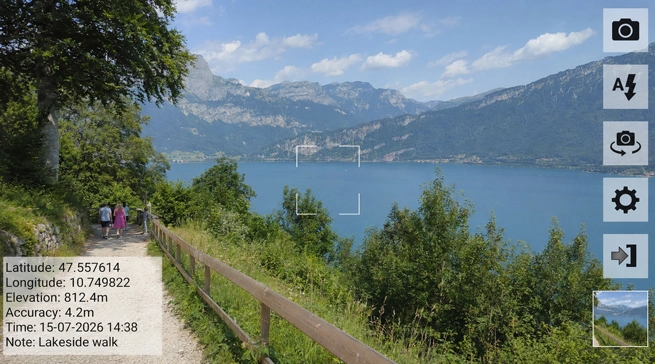
Recent official releases use CameraX as the default camera API. If the installed build includes a Camera API Setting and produces a rotated image or unsuitable resolution, switch to Camera2 and take another sample. Older modified builds may not contain the same menu. Photos already saved will not be corrected automatically, so check the result again before recording the rest of the job.


Leave a Reply