
The Black Edition interface put the catalogue at the center of Nonton Anime Streaming Anime. Its archived Android listing describes searching for a known title or starting with a genre. An entry can belong to the same collection in either case. The two ways of looking it up serve different moments, depending on how much the person remembers about the series.
Finding a title in the catalogue
Title search
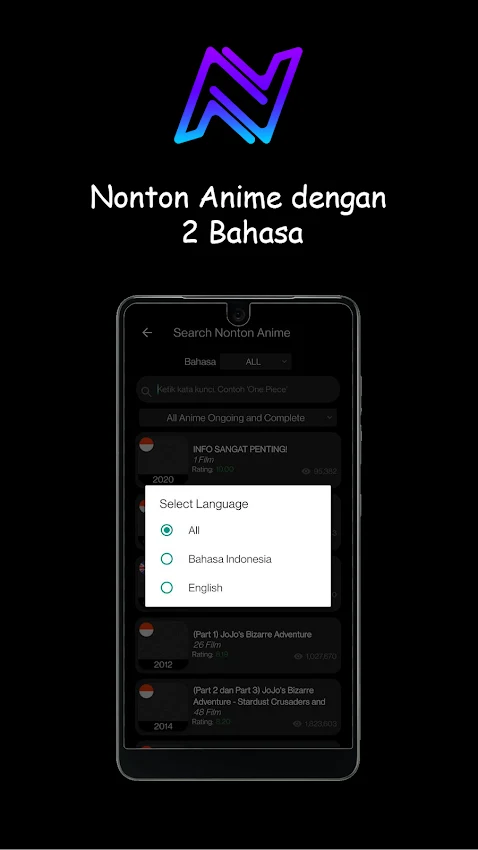
The title search described in the listing was a direct way to look for a series by name. That can help explain a search screen when the cover alone is hard to recognize. The Black Edition name referred to the interface surrounding those entries. The original gallery also shows a language selector over that dark interface.
Genre browsing
Genre search began from a category rather than a specific name. Entries for anime films, live-action material and tokusatsu series were also mentioned in the original listing. Seeing those terms in old screenshots helps identify which part of the collection a view belongs to. A genre heading is a different clue from a single series title on a card.
Viewing history and bookmarks
The archived listing for Nonton Anime Streaming Anime Mod Apk placed viewing history and bookmarks in two separate lists. A bookmark belonged to a title someone chose to keep on a list. History dealt with entries they had already visited through the app. That separation is why an older screenshot can show a different set of titles even when it comes from the same account and interface.
The archived listing also described backup support for both lists. That small detail is worth noticing when reading the old feature description. The catalogue kept discovery and recall in separate views, but the developer grouped their stored records together when describing backup. It gives an extra clue to the role of History alongside Bookmark in the older Black Edition design.


Leave a Reply