
MathPapa Algebra Calculator Mod Apk: a popular algebra calculator and step-by-step solver that helps students check work, visualize steps, and build confidence with equations, inequalities, graphing, and more. If you’re looking for help with algebra on Android, you’ve probably seen search results promising a “MathPapa MOD APK.” Here’s what you should know before you tap download.
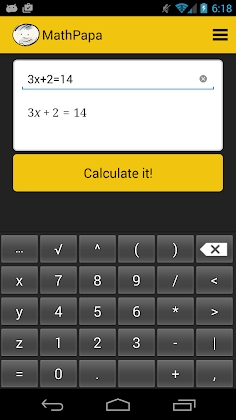
What Is MathPapa?
Core features at a glance
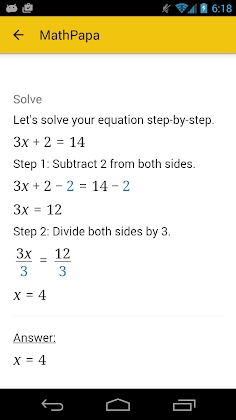
Step-by-step solutions for many algebra problems
Support for equations, inequalities, graphing, fractions, and polynomials
Practice problems and explanations that show how to get from A to B
Clean interface designed for quick checks and study sessions
Who it’s for
Middle school to college students taking algebra or pre-calculus
Parents and tutors who want a structured way to review steps
Adult learners brushing up on math fundamentals
The Truth About “MathPapa MOD APK” Downloads
What a “MOD APK” claims to do
A “MOD” (modified) APK is an altered Android app that often promises premium features for free, unlimited access, or ad-free experiences—without official authorization.
Why this is a bad idea
Security risks: Modified APKs frequently bundle spyware, adware, or code that steals passwords, messages, or files.
Privacy risks: Side-loaded apps may bypass Android’s newest protections and quietly harvest data.
Legal & ethical issues: Using cracked or modified apps violates developer terms and can infringe on intellectual property.
No updates, no support: You won’t receive critical bug fixes, feature updates, or legitimate customer support.
Academic integrity: Shortcuts that hide steps or use tampered solutions can undermine honest learning.
Bottom line: If you see “MathPapa MOD APK,” treat it as a red flag. Protect your device, your data, and your grades.
Safe, Legitimate Ways to Use MathPapa on Android
Install from Google Play: Search “MathPapa” in the Play Store and download the official app.
Use the official site: If you prefer a browser, use MathPapa’s website from Chrome on Android.
Keep it updated: Allow automatic updates for security patches and new features.
Avoid side-loading: Don’t install APKs from random links, file-sharing sites, or “MOD” repositories.
Optional: Premium the right way
If MathPapa offers premium features, purchase them in-app through Google Play. You’ll get secure billing, refund options, and ongoing updates.


-3.jpg)
Leave a Reply