Libra Weight Manager Mod Apk: Maintaining a healthy weight is essential for overall well-being, but tracking progress effectively can be challenging. Libra – Weight Manager is a powerful Android app designed to help users monitor their weight effortlessly. With its intuitive interface, trend analysis, and goal-setting features, Libra stands out as a go-to weight management tool.
Key Features of Libra – Weight Manager
Simple and User-Friendly Interface
Libra features a clean and straightforward interface that allows users to log their weight with ease. The app provides a quick overview of progress without unnecessary complications.
Trend Analysis with Graphs
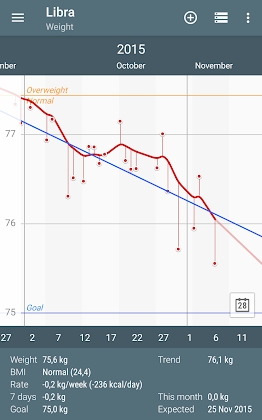
The app provides detailed graphical representations of weight trends over time. By analyzing data points, users can track their progress and make informed decisions about their diet and fitness routines.
Customizable Goal Setting
Libra enables users to set personalized weight goals, whether it’s weight loss, gain, or maintenance. The app calculates the estimated time needed to reach the goal based on current trends.
Daily Weight Logging
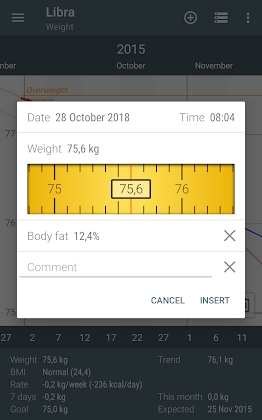
Users can enter their weight daily and compare changes over time. The app allows for easy data entry with support for both manual input and synchronization with smart scales.
BMI and Statistics Tracking
Libra calculates Body Mass Index (BMI) and provides insightful statistics to help users understand their progress and maintain a healthy weight range.
Google Fit Integration
The app seamlessly integrates with Google Fit, allowing users to sync their weight data across multiple fitness applications.
Data Backup and Export
Libra offers cloud backup and CSV export options, ensuring users never lose their progress data and can transfer it to other platforms if needed.
Target Weight and Forecasting
With its predictive analysis, Libra estimates when a user will reach their target weight, providing motivation and encouragement throughout their journey.
How to Use Libra – Weight Manager
Install and Set Up the App
- Download Libra – Weight Manager from the Google Play Store.
- Open the app and input your current weight, target weight, and other preferences.
Log Your Weight Regularly
- Enter your weight daily or as frequently as preferred.
- Use the graph view to track progress over time.
Analyze Trends and Adjust Your Plan
- Review weight trends and BMI calculations.
- Make necessary changes to diet and workout plans based on the insights.
Sync with Google Fit (Optional)
- Connect the app to Google Fit for automatic data synchronization.
Export and Backup Data
- Secure your weight tracking history by exporting it in CSV format or using the cloud backup option.
Benefits of Using Libra – Weight Manager
Encourages Consistency
Tracking weight regularly helps users stay committed to their fitness goals.
Provides Data-Driven Insights
By analyzing weight fluctuations and trends, users can identify what works best for their body.
Personalized Goal Tracking
Libra adjusts progress estimates based on real-time data, keeping users motivated.
Easy Data Management
With Google Fit integration and CSV exports, users can store and analyze their weight data conveniently.


Leave a Reply