
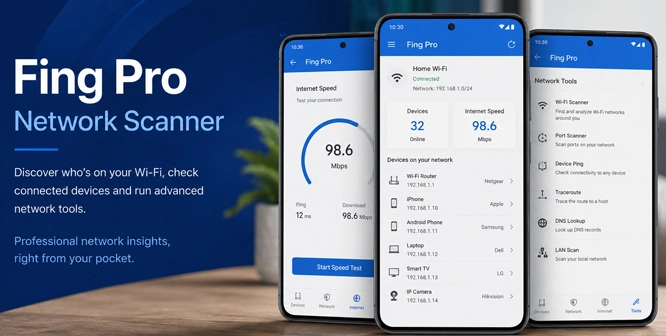
Count only the phones and laptops, and a home network can still look overcrowded. The unexplained entries are often ordinary: a mesh node, television, printer, speaker, console, or smart plug. Fing Pro Mod APK is an Android network scanner for sorting through that list. It checks the Wi-Fi currently connected to the phone and attempts to identify each device. Fing reports what it finds. The person reading the list still has to work out which device is which.
The Unknown Device May Be Sitting in the Next Room
Open an entry you recognize and replace its automatic label with something useful. Fing accepts a custom name and location. “Hallway speaker” will make sense next week; Generic will not. When an entry remains unfamiliar, compare the IP address shown by Fing with the network details on the phone or computer you suspect. Do that before changing the Wi-Fi password or blocking anything.
Newer Android phones give the app less information to work with. Starting with Android 13, mobile apps cannot read MAC addresses during a scan from the handset. Fing bases recognition on IP addresses instead, so an incorrect name or device type may appear. Fing Desktop and Fing Agent are not affected by this restriction.
Android’s location permission matters for an unexpected reason. Fing uses it to read the SSID and keep device edits tied to the correct network. Without that access, the Wi-Fi name may be missing and saved labels can return to Generic.
At a rental property, the hidden-camera search stays inside the network joined by the phone. Anything using another network, or not online at all, will remain outside the scan. Fing’s instructions also call for separate checks of the 2.4 GHz and 5 GHz access points. A suspicious entry cannot reveal where the hardware is located. The room still needs to be inspected.
Slow Wi-Fi Needs More Than One Number
A video call can break up even when the download figure looks respectable; latency may be the part causing trouble. Run the speed test beside the router, then repeat it in the room where calls drop. A large gap makes weak coverage or local interference more likely. The Android Wi-Fi scanner can display nearby access points and channel use, although a channel change must be made in the router settings.
When every device loses Internet access, ping the router first and then a public domain. A reply from the router shows that the phone can still reach the local network. Failure beyond that point may involve DNS, the provider or the destination itself. Traceroute shows how far traffic progresses, while DNS Lookup reveals the address returned for a domain name.
Port scanning is a different job. Use it only on a device or server you own or have permission to inspect. A media server or remote-access tool may intentionally listen on an open port, so the result alone does not show a compromise. Check the service and the router configuration before treating the port as a vulnerability.
The Phone Cannot Watch an Empty House by Itself
A manual scan records one moment. Fing’s official plan comparison caps manual scans on the Free tier and lists unlimited scans under Premium. An unlimited number of snapshots is still not a timeline.
Continuous monitoring, event history, remote alerts, and controls for blocking or pausing devices require an active Fing Desktop, Fing Agent or Fingbox. After one of those units is linked to an account, the mobile app can act as its remote display and controller. Turn off the computer or Agent and the updates stop; Fing also requires the supporting unit to remain active for blocking.
A quick mobile scan does not require an account. Pairing Mobile with Desktop or Agent does. The APK is labeled Premium, and no more specific mod behavior is confirmed. That label does not show that Fing has granted Premium status to the signed-in account, nor can it replace the separate monitoring unit required for continuous tracking and network control.


Leave a Reply