
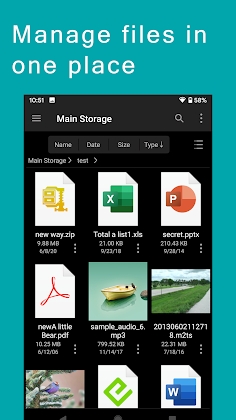
FE File Explorer Pro Mod Apk: stands out as a robust file manager app available on both Android and iOS platforms. This versatile application goes beyond mere file management, allowing users to access files from various sources, including computer NAS and cloud storages. In this article, we’ll delve into the features that make FE File Explorer Pro a powerful tool for file organization and accessibility.
Seamless Network Connectivity
SMB/CIFS Integration
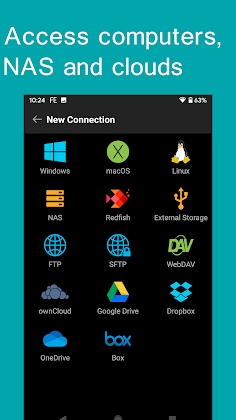
The app supports SMB/CIFS protocols, enabling users to access network shares in macOS, Windows, Linux, and NAS devices. This facilitates easy and seamless file transfers across different platforms.
WebDAV, FTP, and SFTP Access
FE File Explorer Pro extends its reach by providing access to WebDAV, FTP, and SFTP servers. This inclusive approach ensures compatibility with a wide range of server types, enhancing the app’s versatility.
Cloud Storage Integration
The app seamlessly integrates with various cloud storage services, including:
- OneDrive for Business
- OwnCloud
- Google Drive
- Dropbox
- OneDrive
This means users can manage and transfer files between their local storage and these cloud platforms effortlessly.
Local Storage Management
FE File Explorer Pro offers comprehensive control over files stored on Android devices, including:
- Access to files on internal storage
- SD card management
- USB OTG support
Additionally, the app automatically identifies computers as NAS when establishing new connections.
Advanced Features FE File Explorer Pro Mod Apk
Windows Domain, Active Directory, and DFS Support
FE File Explorer Pro goes a step further by providing support for Windows Domain, Active Directory, and DFS. This ensures a seamless and integrated experience for users within complex network environments.
File Operations on Android
Users can perform essential file operations directly from their Android devices, such as moving, renaming, and deleting files.
Edit in Place
The app allows users to edit documents stored on remote storage directly. Any changes made are automatically saved back to the remote storage.
Archiving and Unarchiving
FE File Explorer Pro supports the unarchiving of Zip, RAR, and archiving of ZIP and 7zip files, providing users with a comprehensive file compression and extraction tool.
Multimedia Streaming
The app extends its functionality beyond file management by allowing users to:
- Stream movies and music directly to Android smartphones and tablets
- Stream content from distant storages to Android devices
Efficient File Transfers
FE File Explorer Pro facilitates seamless file transfers, including:
- Moving files between different storage locations
- Transferring files from remote storage to Android devices
- Backing up camera photos to remote storage
- Transferring files between iOS and Android devices


Leave a Reply