A bass-heavy track can bury the vocals on a pair of headphones that already emphasize the low end. Equalizer & Bass Booster Pro adjusts the sound of music and video on Android while your usual player handles playback. Its five-band equalizer changes the balance between frequency ranges, so you can work on the low end while keeping the rest of the track at a comfortable level.
Keep the song or video playing in the app you normally use. Then open the equalizer and use its sound controls while the same audio continues. The Normal preset offers a starting point before adjusting individual bands. Comparing two settings within one track lets you hear how an adjustment changes the kick drum, a spoken line or another sound you can pick out. The listening app still handles the queue, playback and media files.
Four controls for the same track
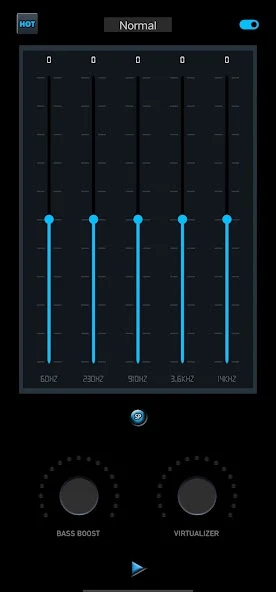
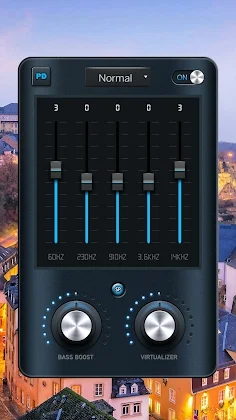
- Five-band equalizer. The vertical sliders act on different frequency ranges. The lower bands affect low instruments and drum weight, while the middle bands have more influence on the part of the sound occupied by voices. Use the upper bands to adjust bright details such as cymbals.
- Bass Boost. The dedicated dial changes the weight of the low end. For a song that already has a strong kick, you can leave this control low and shape the rest of the sound with the sliders.
- Virtualizer. This dial changes the sense of space around the sound. On headphones, compare a recording with the virtualizer low and then raised to hear how the apparent spread changes.
- Volume gain. Gain changes the level of the signal as a whole. It serves a different purpose from the bass dial and the slider for any one frequency band.
The five sliders in Equalizer & Bass Booster Pro Mod Apk are useful when the frequency balance is the problem and the listening volume is already right. You can also use the controls when playing through a Bluetooth speaker. Headphones are the developer’s recommended way to hear the effects, especially the change in space from the virtualizer.
The notification has a close control for ending the equalizer session. For your first adjustment, play a familiar vocal track with the equalizer on Normal and the Bass Boost dial low. Lower the leftmost frequency slider by a small amount during the chorus. That band is a concrete starting point for hearing whether the bottom end of the mix was covering the voice.




Leave a Reply