
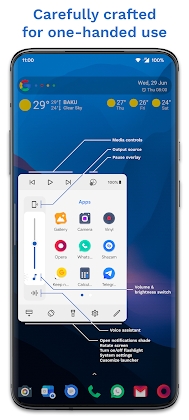
Edge Card Launcher Side Panel Mod Apk: lightweight Android utility that brings your most-used apps, actions, and widgets to the edges of your screen. Think of it as a sliding “side dock” you can summon from any app to jump faster between tasks, trigger tools (flashlight, screenshots, timers), or peek at glanceable info (calendar, weather, clipboard, notes).
Why People Like It
Speed: One swipe from the edge opens apps or actions instantly.
Focus: Keep your home screen minimal while your essentials stay one gesture away.
Customization: Cards, panels, and gestures can be tailored to fit your workflow.
A Word on “Mod APKs”
Using a “Mod APK” means installing an unofficial, modified package. That can:
Break terms of service for some apps.
Expose your data to untrusted code.
Disable updates or cause instability.
If you value security and support for the developer, the official Play Store version (or the dev’s official site) is the safer path. If you still explore mods, verify checksums, scan with mobile security tools, and use on a secondary device—not your primary phone.
Key Features (What to Expect)
Edge Cards & Panels
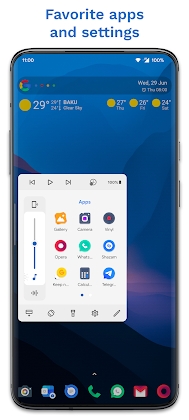
App Cards: Pin your most-used apps to cards along the edge.
Action Cards: One-tap tools like Wi-Fi toggle, flashlight, Do Not Disturb, or QR scanner.
Widget Cards: Mini-widgets (clock, weather, calendar) that slide out without leaving your current app.
Gesture & Shortcut Engine
Swipe Zones: Define left/right edges, thickness, and sensitivity.
Gesture Types: Short swipe, long swipe, hold-and-drag, double-swipe for different actions.
Per-App Profiles: Use a gentler sensitivity in games and stronger in reading apps.
Smart Organization
Folders & Stacks: Group cards (e.g., “Work,” “Travel,” “Media”).
Priority Ordering: Most-used cards bubble up over time.
Contextual Rules: Show certain cards only when headphones are connected, at work Wi-Fi, or during specific hours.
Theming & Visual Polish
Adaptive Colors: Match your system theme or wallpaper.
Transparency & Blur: Subtle translucency for a premium look.
Icon Packs: Support for third-party icon sets to keep everything cohesive.
Setup & Onboarding
Initial Configuration
Grant Core Permissions: Overlay (“draw over other apps”) and accessibility service are typically required so the panel can open atop other apps and respond to edge gestures.
Pick Your Edge: Left or right, inner or outer corner—choose what feels natural.
Add Essentials: Start with 6–8 core apps + 3–4 actions (e.g., search, flashlight, notes, timer).
Safety Tips (If You Install Outside Play Store)
Source Check: Only from reputable, community-vetted repositories.
Integrity Check: Verify file hash if the publisher provides it.
Scan First: Run a local malware scan before installing.
Back Up: Use cloud backups for contacts, photos, and messages.
Daily Use: Make It Work for You
For Productivity
Two-Step Launcher: Swipe → type a few letters → launch.
Quick Paste: Keep a clipboard card to paste recent snippets into any app.
Mini-Agenda: Slide in a calendar card to check the next meeting without leaving the current app.
For Media & Creativity
Audio Controls: Volume, playback, and device switcher on a compact card.
Capture Tools: Screenshot and screen-record shortcuts; optionally auto-file into project folders.
Color Picker: Designers can pin a color-picker card to grab hex codes from the screen (if supported).
For Travel
Transit Card: Keep rideshare or transit apps plus a currency converter in one stack.
Offline Notes: A “Trip Notes” card for confirmation numbers and key addresses.
Performance & Battery
Tuning for Smoothness
Edge Sensitivity: Lower sensitivity reduces accidental triggers and CPU wake-ups.
Animations: Disable heavy blur/blur radius on older devices.
Blacklists: Exclude full-screen games or camera apps to avoid conflicts.
Battery Considerations
A well-optimized edge launcher uses modest resources (idle overlays + occasional gesture listeners).
Watch for aggressive OEM battery savers (MIUI/EMUI) that may kill the background service; whitelist the app if needed.


Leave a Reply