
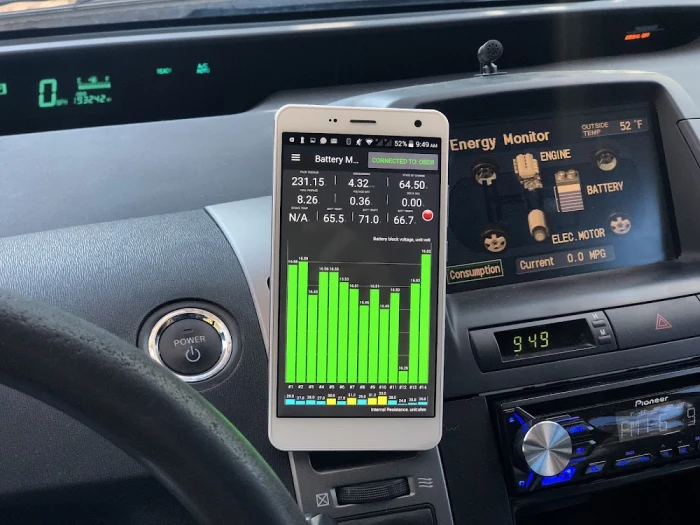
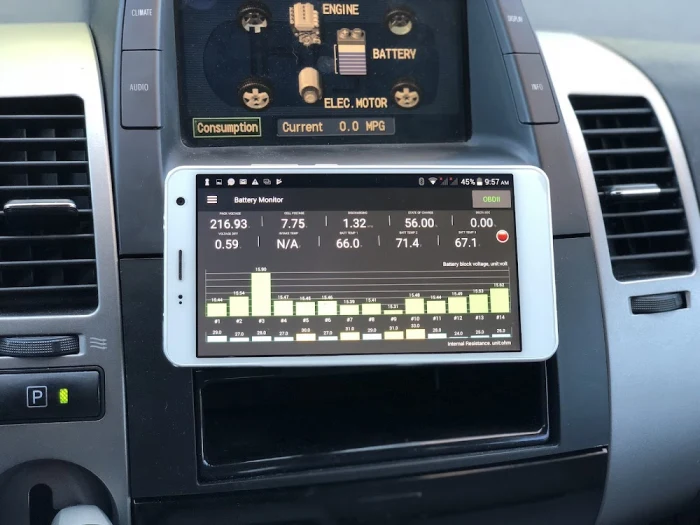
Dr. Prius / Dr. Hybrid suits Toyota and Lexus hybrid owners who want to see what their vehicle reports about its traction battery while parked. The Battery Monitor groups those readings on one screen. At the top are figures for the pack, with a chart of the individual battery blocks below. The chart gives the owner more detail than the charge icon on the car’s display.
The app needs a compatible Bluetooth OBD adapter and a supported vehicle to read battery data. The developer warns that some adapters sold with the same label cannot communicate with the necessary control units. That matters before you try to interpret a blank display. A reading depends first on whether the app can receive that value from the vehicle.
Pack readings and the block chart
The Battery Monitor in Dr. Prius / Dr. Hybrid Mod Apk shows pack voltage, state of charge and individual block voltages. The pack voltage is one reading for the battery as a whole. The bars show the values reported for smaller groups. The screen also displays a voltage difference, which is separate from the total for the pack. The labels help you keep those three views of the same battery apart.
Battery temperature and internal resistance are recorded as separate fields on the monitor. The resistance values sit below the voltage chart. Keep each field’s label and unit when discussing it with a technician. If a value is missing, the N/A marker identifies an unavailable reading and should be kept as such in your notes. Some vehicles and Bluetooth adapters expose a different set of readings, so two screenshots do not always have the same fields filled in.
The bars and temperatures reflect what the car is reporting at the time. A momentary difference between two bars is an observation about that point in time. It does not give the owner a remaining service life on its own. When writing up an observation for a technician, include the exact monitor label so it is clear the difference between pack charge, pack voltage and an individual block.
The developer documents a Battery Monitor log on Android. The recorded values give you something more precise to refer back to than a memory of the chart after it has changed. For a service discussion, keep the vehicle details with the observations, including which readings were present and which were unavailable. That context may matter as much as the individual numbers in the file.



Leave a Reply