Dict Box Universal Offline Dictionary Mod Apk: powerful, versatile offline dictionary app for Android users, known for its speed, accuracy, and comprehensive features. Whether you’re a student, a professional, or simply someone passionate about learning languages, Dict Box serves as an invaluable tool to enhance your vocabulary and language skills. In this article, we’ll explore everything you need to know about Dict Box, from its features and benefits to tips on how to make the most of this remarkable app.
What is Dict Box?
Dict Box is an offline dictionary and translator app that supports multiple languages. It is designed to help users translate words and phrases quickly without requiring an internet connection. This makes it an ideal tool for students, travelers, and language enthusiasts who need instant access to reliable translations.
Key Features
Offline Functionality
One of the standout features of Dict Box is its offline capability. Unlike many other dictionary apps, Dict Box allows you to look up words and phrases without an internet connection. This is especially useful when traveling abroad or in areas with limited connectivity.
Multiple Language Support
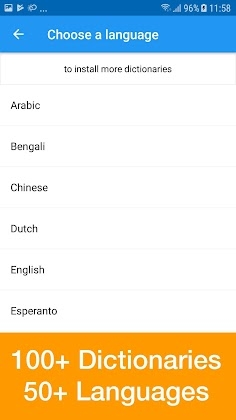
Dict Box supports a wide range of languages, including but not limited to:
- English
- Spanish
- French
- German
- Italian
- Chinese
- Japanese
- Korean
- Arabic
- Persian
This makes it a perfect companion for multilingual users or language learners who need to switch between different languages.
Smart Word Suggestions
Dict Box provides intelligent word suggestions as you type, helping users find the right word even if they are unsure of the spelling. This feature enhances the user experience by making searches faster and more accurate.
Audio Pronunciation
The app includes audio pronunciations, allowing users to learn the correct way to pronounce words. This is particularly beneficial for language learners aiming to improve their speaking and listening skills.
Word Reminder and Flashcards
Dict Box offers a built-in flashcard system, enabling users to save words and practice them later. The word reminder feature regularly prompts users to review saved words, promoting effective vocabulary retention.
Image Dictionary
With its image dictionary feature, users can search for words using pictures. This is particularly useful for visual learners who find it easier to remember words associated with images.
Cloud Backup and Sync
Dict Box allows users to back up their word lists and sync them across multiple devices. This ensures that users never lose their saved words, even when switching devices.
Customizable Themes and Layouts
The app offers various themes and customizable layouts, allowing users to personalize their experience for maximum comfort and ease of use.
How to Use Dict Box Effectively
Offline Setup and Language Downloads
After installing Dict Box, users need to download the language packs they wish to use offline. This can be done through the settings menu. Make sure to download the necessary languages when connected to Wi-Fi to avoid excessive data usage.
Using the Search Function
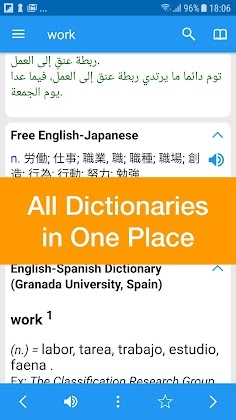
Simply type the word you want to look up in the search bar. Dict Box will provide multiple translations, definitions, and example sentences to help you understand the context of the word.
Creating Flashcards for Learning
To maximize your learning experience, save new words to flashcards by tapping the star icon. These words can be reviewed later, making it easier to retain new vocabulary.
Exploring Audio Pronunciations
Tap the speaker icon next to a word to listen to its pronunciation. This is a great way to practice speaking and improve your accent.
Cross-Device Syncing
To keep your saved words synchronized across all your devices, create an account on Dict Box and enable the cloud sync option. This is particularly useful for users who switch between a smartphone and a tablet.
Advantages of Using Dict Box
Speed and Convenience
With its offline functionality, Dict Box offers fast translations without any lag or dependence on an internet connection. This makes it a reliable resource in remote locations.
Comprehensive Language Support
The app’s extensive language support caters to a global audience, making it a versatile choice for multilingual users.
User-Friendly Interface
Dict Box is designed with a clean, intuitive interface that makes navigation easy for users of all ages.
Enhanced Learning Tools
With built-in flashcards, audio pronunciations, and word reminders, Dict Box is not just a dictionary but a complete language-learning tool.
No Advertisements (Premium Version)
By upgrading to the premium version, users can enjoy an ad-free experience, providing uninterrupted learning and searching.
Limitations of Dict Box
In-App Purchases
While the basic version of Dict Box is free, some advanced features require a one-time purchase. This includes additional language packs, cloud sync, and the removal of ads.
Limited Contextual Translations
Though Dict Box provides definitions and example sentences, it may not always offer extensive contextual translations compared to online services like Google Translate.
No Live Conversation Translation
Unlike some competing apps, Dict Box does not support real-time conversation translation, which could be a drawback for travelers needing instant communication assistance.
Comparing Dict Box with Other Dictionary Apps
Dict Box vs. Google Translate
While Google Translate provides powerful live translation and voice recognition features, Dict Box shines in offline use and educational tools like flashcards and word reminders.
Dict Box vs. Merriam-Webster Dictionary
Merriam-Webster is ideal for native English speakers looking for detailed definitions, whereas Dict Box caters more to language learners with its multilingual support and educational features.
Dict Box vs. Oxford Dictionary
Oxford Dictionary offers in-depth definitions and historical context, but Dict Box provides a broader range of languages and offline accessibility, making it more versatile for global users.
Is Dict Box Worth Using?
Dict Box is an excellent choice for anyone looking to expand their vocabulary, learn new languages, or simply have a reliable offline dictionary at their fingertips. Its wide range of features, combined with ease of use and multiple language support, make it a valuable tool for students, travelers, and language enthusiasts alike.

Leave a Reply