
Cool EM Launcher for EMUI Mod Apk: Explore the dynamic world of Android with Cool EM Launcher, a creation inspired by Huawei Mate 40 EMUI Launcher P30. While not an official Mate 40 EMUI Launcher P30, this product is designed to bring value to EMUI and other brand phone users. Let’s delve into the features and offerings of Cool EM Launcher.
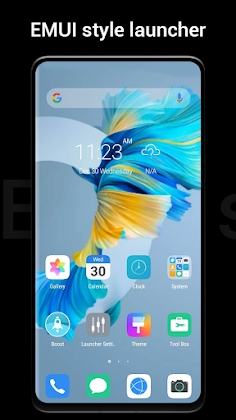
Cool EM Launcher Compatibility
Android 4.1 and Beyond
Cool EM Launcher is compatible with all Android 4.1 devices, ensuring a wide range of supported devices.
Features
Icon Pack Compatibility
Cool EM Launcher seamlessly supports almost every icon pack available in the Play Store, offering users diverse customization options.
Themes and Wallpapers
Explore a plethora of options with 600 themes and over 1000 wallpapers, allowing users to personalize their Android experience.
Gesture Support
Cool EM Launcher introduces gesture support, including swipe gestures, pinch gestures, and two-finger gestures, enhancing user interaction.
Multiple Styles
Choose from four distinct styles – list drawer, horizontal vertical drawer, or category drawer – to tailor the launcher to your preferred layout.
Dynamic Wallpapers
Experience Video Wallpaper and Live Wallpaper options, adding a dynamic and visually appealing element to your Android interface.
Privacy Features
Hide your apps with the Hide Apps feature and ensure privacy with App Lock, providing users with control over their app visibility.
Flash Call Animation
Enjoy a cool animation when receiving calls with the Flash Call feature, adding a touch of flair to your phone experience.
Round Corner Display
Opt for the Round Corner feature to give your phone a full-screen look, adding a sleek and modern touch to your interface.
Utility Tools
Discover a range of built-in utility tools, including Battery Saver, Booster, and more, enhancing the functionality of Cool EM Launcher.
Unread Notifier
Never miss an important message with the Unread Notifier prominently displayed on the Launcher Desktop Icon.
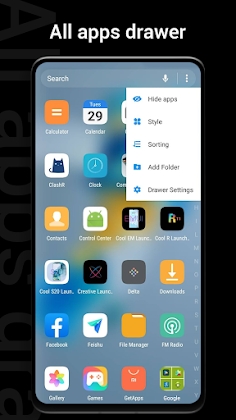
Customization Options
Adjust the launcher icon size, choose from various desktop launcher transition effects, and explore multi-dock pages for extensive customization.
Quick Search App with T9 Search
Access apps quickly with the Quick Search App featuring T9 Search functionality, streamlining your navigation experience.
Desktop Options
Explore a multitude of options, including dock background color, style, folder, and font options, providing users with unparalleled customization.
![[Sub/EMUI] MIUI 10 Pro EMUI 8.1/8.0/5.X Theme Apk Mod](https://dlandroid.com/pic/sub-emui-me-ui10-pro-emui-apk-200.jpg)


Leave a Reply