Concepts Mod APK turns your Android phone or tablet into a visual notebook with no edges. Instead of jumping between separate pages, you scroll and zoom across one huge canvas where sketches, notes and layouts sit together. After you download the modded build, the full toolset is available from the first launch, so you move straight into drawing and planning instead of unlocking features step by step.
Endless canvas for sketches, notes and layouts
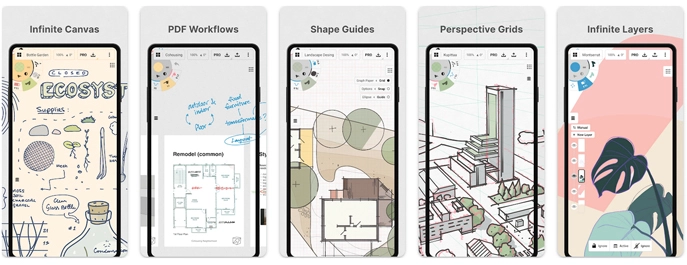
The main canvas in Concepts feels closer to a whiteboard than a classic drawing app. A whole project can live in one place: character thumbnails in one corner, UI wireframes in another, notes from a meeting connecting everything in between. Architects block out spaces and circulation flows, illustrators test poses and expressions, students keep diagrams, formulas and handwritten comments on the same board.
Because the drawing engine is vector based, every stroke stays flexible. You can grab a group of lines, push it to a new spot, scale it up, thin the outline or switch the color without losing clarity. When a layout no longer works, you adjust what is already there instead of erasing and starting over. The canvas becomes a playground for revisions, mindmaps and rough drafts where changing direction is completely normal.
Drawing tools that respond to your hand
Concepts Mod APK includes a wide range of pens, pencils, markers and brushes that react to pressure, tilt and speed. Live smoothing helps curves stay steady but still leaves your own style visible on the page.
Paper presets and grids give structure when you need it. You move between a clean background for illustration work, a dotted grid for UX layouts or graph paper for technical sketches. A customizable tool wheel or toolbar keeps favourite brushes, erasers and color swatches close, so switching tools is almost automatic and does not pull you out of the drawing flow.
Layers and color control for detailed scenes
As ideas grow, projects naturally split into layers. Concepts stacks those layers with adjustable opacity, leaving room for rough sketches, refined lines, shading, annotations and construction guides. Support layers can be faded down when they are only there for reference, or hidden completely before exporting a final image.
For color work the app offers HSL, RGB and COPIC-style wheels. You can build palettes that match brand guidelines, comic pages or interior design schemes, then reuse them across different canvases. Since everything you draw is vector based, recoloring a character, logo or product mockup is usually a matter of selecting it and dialing in a new tone.
Workspace for design, study and planning
Concepts is used by far more people than just illustrators. Designers draft logos, app interfaces and marketing layouts alongside notes from client calls. Engineers capture diagrams and quick calculations next to photos taken on site. Students write lecture notes, draw arrows and highlight key ideas directly on imported slides or PDFs. Most of the time you sketch loosely and think on the page, and when something needs to line up perfectly you switch on the snapping tools and tighten the drawing. Rough idea maps and polished diagrams can live comfortably on the same canvas.
Measurement readouts keep distances and angles under control, so plans and technical sketches stay believable. Screenshots, reference images and photos can be dropped onto the canvas, scaled and annotated, which is especially useful in product design, UI work and architecture studies.
Unlocked features in the modded build
The standard release of Concepts keeps several powerful options behind subscriptions and separate purchases. Concepts Mod APK removes those barriers and turns everything on from the beginning. Selection and editing tools are ready to use, including precise lasso and region selections for moving, copying or transforming sections of a drawing.
Unlimited layers and advanced custom grids make it easier to handle heavy projects such as full storyboards, detailed maps, environment layouts or multi-step flowcharts. Professional brush packs and extra pen styles come included, so you can jump between sketching styles without visiting the store each time. Export formats go beyond simple images and include options such as PNG, PSD, SVG and DXF, which makes it easier to refine work later in desktop software or send production-ready files to colleagues and clients.
Smooth performance on modern Android devices
Concepts is tuned for pen-enabled Android phones and tablets. Zooming, panning and rotating the canvas stays responsive even when a project has grown large and layer-heavy. On tablets with stylus support the line follows your hand closely, so sketching feels direct instead of laggy. With the Mod APK you keep this polished performance but start with the complete brush set, layer system and export tools already active.
Everyday use for artists, students and teams
Many people end up using Concepts as their daily visual notebook. Short breaks turn into time for gesture drawings, tiny UI tweaks or environment thumbnails. Longer sessions become deep design work with clearly organised layers and canvases that evolve over days or weeks. The infinite page invites experimentation, and the fact that every stroke can be moved or reshaped removes a lot of the fear of “ruining” a piece.
For artists, designers, students and professionals who prefer thinking on a canvas instead of a blank text document, Concepts Mod APK offers a focused space to develop ideas. Install it on your Android device, open a new canvas and start mapping out work, study plans or creative projects in a way that feels close to drawing on a real desk, but with the freedom of digital editing.

Leave a Reply