
CloudBeats Mod Apk: Running out of storage space is a common problem for music lovers. CloudBeats Pro offers a smarter solution by letting you stream and manage your personal music collection directly from cloud storage services. Instead of filling your phone with thousands of songs, you can access them whenever you need from a single app.
Why CloudBeats Pro Stands Out
Most music players focus on local files or subscription-based streaming services. CloudBeats takes a different approach by turning your cloud storage into a personal music streaming platform. This means you stay in control of your library without paying monthly fees for music you already own.
Features That Music Lovers Appreciate
Stream Directly from the Cloud
Play music instantly from supported cloud services without downloading every file to your device.
Offline Listening
Save favorite albums and playlists for times when an internet connection isn’t available.
Playlist Management
Create custom playlists, organize tracks, and enjoy your music exactly the way you want.
High-Quality Audio Playback
Experience clear sound quality with support for popular audio formats and advanced playback options.
Background Playback
Keep listening while using other apps, browsing the web, or locking your screen.
Supported Cloud Services
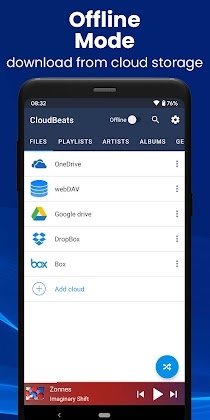
CloudBeats integrates with several popular storage platforms, including:
- Google Drive
- Dropbox
- OneDrive
- Box
- NAS Servers
- Personal Cloud Storage
This flexibility allows users to manage large music collections without relying on device storage.
Perfect for Travelers and Music Collectors
For users with extensive music libraries, CloudBeats provides an efficient way to carry thousands of tracks without consuming valuable phone space.
It’s especially useful for:
- Frequent travelers
- Audiobook listeners
- Podcast collectors
- Users with limited device storage
- Music enthusiasts with large personal libraries
User Experience
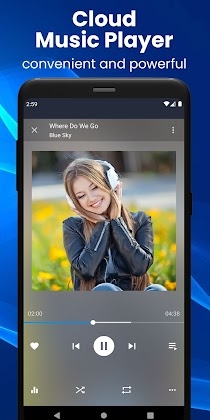
The interface is designed to be clean and distraction-free. Navigation is simple, album artwork is displayed beautifully, and music organization feels intuitive even with large collections.
Unlike many modern music apps filled with recommendations and advertisements, CloudBeats focuses primarily on your own content.
How to Get Started
Install the App
Download and install CloudBeats Pro on your Android device.
Connect Your Cloud Account
Sign in to your preferred cloud storage service and grant access to your music files.
Scan Your Library
Allow the app to index your music collection and organize it automatically.
Start Listening
Browse albums, artists, and playlists, then enjoy seamless streaming from the cloud.



Leave a Reply