Battery Saver – life health Mod Apk Pro: Battery Manager is the best way to manage your battery. A quick overview of your battery usage. It measures battery capacity (mAh), gives you estimates, and offers useful tips for changing your charging habits to prolong the batterys life.
This is a battery protection system that will keep your battery safe and healthy.
To increase your battery life, identify and fix any battery issues.

HIGHLIGHTS
To extend the batterys life, use the charge alarm notification.
– The remaining charge time – Find out how long it takes to fully charge your battery.
– The remaining usage time – Know when your battery is full.
Detailed Application Use
Battery Life
The lifespan of batteries is limited. Your batterys lifespan is limited by how often you charge it. This will cause your device to lose some of its capacity. According to scientific studies, your battery life can be extended up to 200% by charging your device only at 80%.
Charge limit notification
To extend the batterys life, you can use the charge limit notification. The battery manager will notify you when the battery reaches a threshold value.
Charging speed
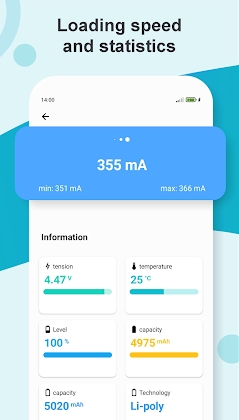
To find the best USB cable and charger for your device, use Battery Manager. To find out how much current is flowing during charging, measure the current in mA. Find out how long it takes to charge and when it will finish charging.
Battery information
A visual overview of the charge status and current information about temperature, charging, discharging, and voltage. This information will allow you to keep your battery in top condition.
One-click optimization
One tap to optimize battery usage and identify and fix any battery issues. By simply clicking “one-click optimization,” battery-discharging services like Bluetooth, WLAN, Bluetooth, brightness screen timeout, and location can be deactivated based on the users settings. This can reduce battery consumption.
Custom energy-saving mode
Create your own energy-saving profile to reduce your battery consumption. You can adjust the screen brightness or turn off Bluetooth.
Ultra energy-saving mode
You can activate the ultra energy-saving mode in an emergency to prolong the batterys life. The user can activate the battery discharge service to deactivate it.
Manage Apps
Find out how to use a particular application. You can access the list of services and permissions, as well as the details of your application signing certificate.
Detailed diagnosis
To be safe, always check your battery. The battery should be checked for temperature, voltage, and condition.
Simple and Modern
The apps interface is very easy to use so you can quickly find your way around.


Leave a Reply