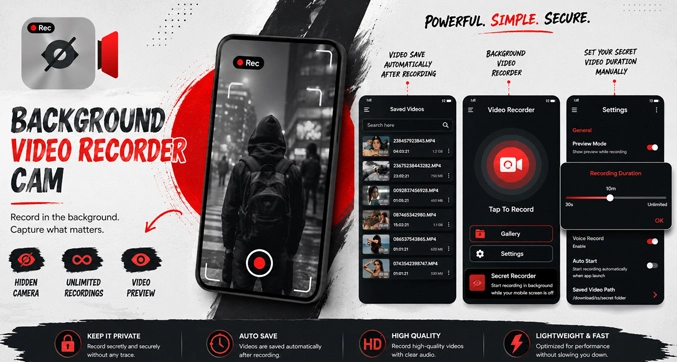
Background Video Recorder Cam Mod Apk: Set the phone in place, start the camera, and leave the usual recording screen behind. Background Video Recorder Cam APK Mod Pro can keep filming while the display is off, another app is open, or the phone is left in a fixed position. You can check the framing through the preview, begin the clip, and then let the camera continue in the background. Voice commands and scheduled recording are also available when touching the phone again would be inconvenient.
Recording Without an Open Camera Window
The regular Android camera is fine for quick clips, but it becomes awkward when recording lasts longer. The screen stays bright, the camera interface blocks everything else, and one careless tap may stop the video before you are ready.
Background Video Recorder Cam removes the need to keep that window open. After filming begins, you can switch off the display or move to another app. The camera continues working without occupying the screen for the rest of the session.
A preview is still available when the position needs checking. Place the phone on a tripod, shelf, desk stand, or another steady surface, adjust the frame, and hide the preview once everything looks right.
A recording can begin with a tap, a spoken command, or a timer set beforehand. Once the phone is sitting in the correct position, touching it again can shift the angle. Voice control avoids that problem. The timer is there for footage that needs to start later, even when nobody is standing beside the device.
Both cameras can be used. The rear lens suits rooms, outdoor scenes, demonstrations, and fixed-angle footage. The front camera handles personal clips and face-to-camera videos. Portrait and landscape modes are included, so the frame can be matched to the subject before recording begins.
Switching off the display does not stop battery use. The camera and processor remain active, and a long clip will still consume power. Screen-off recording mainly removes the bright interface and lowers the chance of an accidental touch.
Video Quality Without Wasting Storage
The app supports Full HD recording up to 1920 × 1080 on compatible phones. It also offers 720p and 480p when a smaller file is more practical.
Full HD keeps faces, text, and small details clearer. It also uses storage much faster, particularly when the camera runs for an hour or more.
For a long session with limited free space, 720p is often easier to manage while remaining clear enough for everyday footage. For a basic record of what happened, 480p may be all you need. It loses some sharpness, but the resulting video takes up less room.
Small writing and faces are where 1080p earns the extra storage. An hour-long fixed shot may be perfectly usable at 720p. Making that choice before recording is much better than finding a full storage warning halfway through the clip.
Sound can remain active or be disabled before filming. Some videos need conversation and surrounding audio. Others only need a visual record. Choosing this in advance avoids ending up with a large clip full of unwanted background noise.
Automatic white balance adjusts the image when lighting changes. Night mode is also available for darker scenes, although software can only do so much with a weak camera sensor. In many cases, adding a nearby light will improve the picture more than changing another camera option.
Storage and Long Recording
The app does not force every clip to stop after a few minutes, but the phone still sets the real limit.
Low battery, rising temperature, limited storage, or Android power management can interrupt a session. Full HD footage may also grow into several gigabytes before it is noticed.
Before an important recording, make a short sample with the same camera, resolution, audio option, and save folder. Play it back, look at the frame, and listen to the sound. Check that the video has not been rotated or stored somewhere unexpected. Half a minute is usually enough to expose a wrong setting.
An SD card can be selected on supported devices. This keeps larger clips away from the internal memory, provided Android allows the app to write to that folder. Some phones are strict about external storage, so check that the first file reaches the selected location.
Battery restrictions are another common reason for interrupted footage. Several Android phones limit apps that continue working after the display goes dark. Allowing the Background Video Recorder Cam to remain active may improve reliability, though the setting has a different name on different devices.
Continued recording during phone calls is also listed among the app’s functions. Results may differ from one phone to another. A call can take control of the microphone, and some systems may pause another camera process. Try the feature on the intended device before relying on it for a real session.
Editing, Compression, and Private Videos
Saved clips can be opened from inside the app. From there, they may be watched, shared, deleted, trimmed, or prepared for transfer.
The editor is useful for cutting away the shaky opening seconds or the moment spent reaching for the stop button. It is not a replacement for a full video editor, but quick trimming is often enough for footage captured from a fixed position.
Compression creates a smaller copy when the original file is too large to send or upload. Some image detail will usually be lost. Keep the original until the compressed version has been played back and checked.
A passcode can block casual access to the recording section. This helps on a shared phone, but it should not be treated as complete protection for every copy of a video. Once the file is moved outside the app, it needs to be handled separately.
Location tagging can attach the recording place to a clip. It may help with travel records, inspections, site visits, or field projects. Personal footage rarely needs coordinates stored inside the file, especially when the video may later be shared.
Background Video Recorder Cam earns its place when you need the phone to record without watching the camera screen the whole time. Its value is not in cinematic effects. It is in setting up the shot, leaving the device alone, and returning later to a completed clip.
Check the frame, available space, microphone, and battery first. Then record a brief sample before starting anything important.
People should know when they are being filmed. Recording rules differ between locations, so background capture should be handled with the same care and consent as any other use of a camera.



Leave a Reply