
AlfaOBD Mod Apk Patched brings full FCA diagnostics to your Android phone, so you can check, tweak, and maintain your car without sitting in a dealer waiting room. The app talks directly to the ECUs used in Stellantis vehicles and turns a regular smartphone plus a compatible OBD adapter into a powerful scan tool.
FCA diagnostics on your Android phone
AlfaOBD is built specifically for the electronic systems used in Alfa Romeo, Fiat, Lancia, Chrysler, Dodge, RAM, and Jeep models, with additional support for the Peugeot Boxer and Citroën Jumper. Instead of a generic OBDII reader that only reads basic engine codes, AlfaOBD can access engine, gearbox, ABS, airbag, body computer, climate control, and many other modules. The patched Mod Apk keeps these advanced functions available on Android so you can work in the driveway, garage, or shop with the same style of data you expect from dealer-level equipment.
Real-world use for Alfa, Fiat, Jeep, and RAM owners
The value of AlfaOBD shows up in everyday situations. Owners use it to read detailed fault codes and look at the conditions that triggered them, then clear the warnings once the problem is fixed. Service reminders and oil change counters can be reset after maintenance. Body and comfort settings, such as daytime running lights, automatic door locking, follow-me-home lights, or cluster options, can be adjusted on supported vehicles.
On trucks and SUVs, AlfaOBD often becomes part of a regular toolbox: enabling towing options, checking ABS and transmission data before long trips, monitoring diesel parameters, or verifying that retrofits and accessory installations have been recognized by the car’s ECUs. Because the app works offline once installed, it is easy to keep it on a workshop device or a dedicated Android phone next to your tools.
Supported vehicles, ECUs and adapters
The application targets FCA and Stellantis platforms where native ECUs are used, from older CAN-based Fiat and Alfa models up to recent Chrysler, Dodge, RAM and Jeep vehicles. For many cars built from model year 2018 onward, a security gateway module (SGW) protects the network from unauthorized access. AlfaOBD can still perform diagnostics on these vehicles, but full functionality requires a proper SGW bypass that opens the secure network for legitimate tools. On platforms such as the Fiat 500X and Jeep Renegade or Compass (MP), the bypass needs to handle the second high-speed CAN bus connected to pins 12 and 13 of the OBD connector.
A compatible interface is just as important as the software. AlfaOBD is designed to work with reliable ELM327-based units and other professional OBD interfaces listed on the official website. When users see messages like “Interface reports NO DATA” or “Interface reports CAN ERROR”, the cause is usually a cheap or defective adapter instead of a problem with the app itself. Choosing a tested Bluetooth or Wi-Fi adapter avoids a lot of frustration and keeps connections stable while you run procedures.
Key features in the patched AlfaOBD Mod Apk
The patched Mod Apk keeps the Android build focused on diagnostics while unlocking the features enthusiasts and professionals care about most:
- Native access to engine, transmission, ABS, airbag, body, climate control and other control units used in FCA and Stellantis vehicles
- Detailed fault code reading with extended information where available, plus the ability to clear stored errors after repairs
- Live data streams with the option to graph parameters over time for easier troubleshooting and fine-tuning
- Active tests and configuration procedures that let you command actuators, run calibrations, and adjust settings supported by each ECU
- Options for key and remote control programming on compatible models, so replacement keys and fobs can be introduced to the vehicle electronics
- Support for multiple languages, including English, Spanish, German, French, Italian, Russian, Portuguese, Czech, Polish, Hungarian and Turkish, all selectable inside the app
Recent builds are tuned for modern Android releases, so AlfaOBD runs smoothly on newer phones and tablets, including devices on Android 14 and Android 15 when properly configured.
Getting started with AlfaOBD on Android
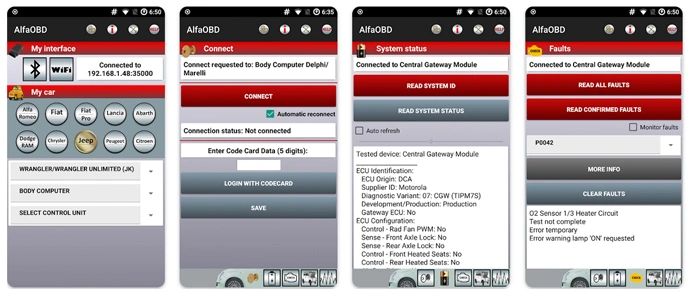
Using AlfaOBD Mod Apk on a car that it supports is straightforward. Install the patched Apk on your Android device, pair or connect your chosen OBD interface, then open the app and select the correct brand, model, and ECU from the internal database. With the ignition switched to the appropriate position and the adapter plugged into the car’s OBD port, the app connects to the selected module and starts reading data.
From there you can perform a complete scan, save reports, and review live values while the engine is running. Graph views make it easier to see fluctuations in temperature, pressure, or sensor readings under load. For many users, this is enough to confirm that a car is healthy before a long trip or after a repair.
Tips for safe diagnostics and coding
Because AlfaOBD can reach deep into the electronic systems of the vehicle, it should be used with care. Before changing configuration values or running adaptations, take the time to read the help documentation and understand what each procedure is designed to do. Keeping the battery in good condition, avoiding unnecessary experiments on critical safety modules, and making changes one step at a time help prevent issues.
When working on cars with a security gateway, make sure the bypass hardware is installed correctly and removed when your session is finished. Treat AlfaOBD with the same respect you would give to a professional scan tool in a workshop environment.
Features patched AlfaOBD
The patched AlfaOBD Mod Apk brings advanced FCA diagnostics to Android in a compact package that fits into a pocket instead of a toolbox drawer. It preserves the native support for Stellantis control units, adds the convenience of a mobile interface, and keeps important functions open so owners, enthusiasts and independent technicians can see what is happening inside their cars. With the right adapter and a bit of patience, AlfaOBD becomes a reliable companion for long-term maintenance, coding tweaks and problem solving on a wide range of Alfa Romeo, Fiat, Lancia, Chrysler, Dodge, RAM and Jeep vehicles.


Leave a Reply